What is Sass?
Sass stands for Syntactically Awesome Stylesheets. You’ve probably heard a lot about Sass, but you might still be a little hazy on what it actually is. Basically, Sass is one of a class of tools called CSS preprocessors. Preprocessors help us code more efficiently by adding special features into normal CSS, such as variables, nested rules, mixins, and more.
Why use it?
Have you ever had to use Find-and-Replace to make edits to colors or fonts across your website? Have you had to copy blocks of code over to multiple other elements in order for them to have the same custom styles? Do your stylesheets get a little repetitive or hairy sometimes? These are all common predicaments that bother every serious developer. Our cardinal rule, after all, is to keep our code DRY.
Sass helps us do just that.
Sure, a few repeated lines of CSS may not seem like a big deal for our class projects, but when you’re managing thousands of lines of production code in the real world, whether for a small startup or a big corporation, things can get pretty messy if you’re careless. CSS preprocessors like Sass help us alleviate that risk, and are thus a common requirement in many of today’s job postings.
Sass vs. SCSS
There are actually two kinds of syntax out there for Sass. Check 'em out:
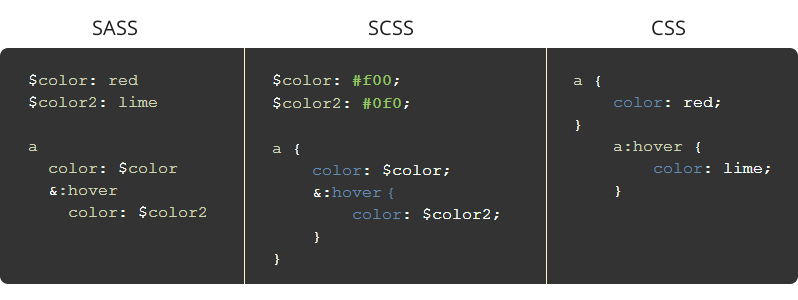
As you can see, .sass syntax removes semicolons and curly brackets, and is arguably easier to type. On the other hand, many find the newer .scss syntax easier to read. In addition, SCSS is fully compliant with CSS, meaning you can rename your .css file to .scss and all your old code will still work. SCSS acts and looks more like your usual CSS, afterall, except with more tricks up its sleeve. If you're interested in reading more, check out this in-depth comparison.
In any case, you are welcome to code using whichever syntax you prefer, but for the most part we will be using SCSS in class.